
SafeClean
Application Interface
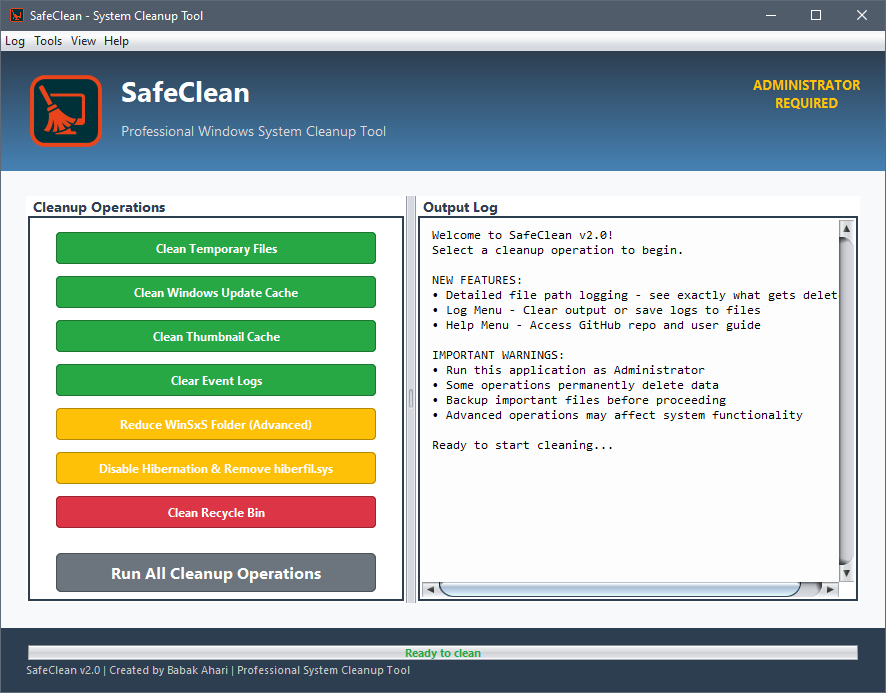
Professional interface with comprehensive cleanup operations and detailed logging
Comprehensive System Cleanup Capabilities:
🗂️ Clean Temporary Files
Removes unnecessary temporary files that accumulate over time, freeing up valuable disk space and improving system performance.
🔄 Windows Update Cache
Clears Windows Update cache files that are no longer needed, helping to resolve update issues and reclaim storage space.
🖼️ Thumbnail Cache Cleanup
Removes thumbnail cache files that can become corrupted or take up excessive space, improving file explorer performance.
📋 Event Logs Management
Clears system event logs while preserving important entries, helping maintain optimal system logging performance.
📁 WinSxS Folder Optimization
Advanced cleanup of Windows Side-by-Side store, reducing the size of this typically large system folder safely.
💤 Hibernation File Management
Disables hibernation and removes hiberfil.sys when not needed, potentially freeing several gigabytes of disk space.
🗑️ Recycle Bin Cleanup
Empties the recycle bin across all drives, permanently removing deleted files and freeing up disk space.
⚡ Run All Operations
Execute all cleanup operations in sequence with a single click, providing comprehensive system optimization.
📋 Project Structure
This project is organized across multiple Git branches to separate concerns:
- Release Branch: Contains download page, documentation, and release files
- Java Branch: Contains the complete Java source code, Maven configuration, and development files
- Main Branch: General project information and overview
🔗 Repository & Development Resources
📦 Repository Branches:
� Release Branch - Download page, documentation & releases
💻 Java Branch - Complete Java source code & development files
📁 Main Branch - Project overview & general information
🌐 Additional Links:
📥 Installation
- Download the latest release:
SafeClean_Setup_v2.0.1.exe - Right-click the installer and select "Run as administrator"
- Follow the setup wizard instructions
- Enter the serial number:
13413412 - Launch SafeClean from the Start Menu or Desktop shortcut